Monday, October 4, 2010

DQuest , ORM framework for Qt/Sqlite

I have made a new OSS project for Qt and mobile. It is DQuest , a C++ ORM (Object-relational mapping) for Qt framework. It aims to provide a rapid development environment for application with database access. The database model declaration is very simple , just like other C++/Qt class. It is designed for mobile environment but also useful for desktop and embedded application that do not demand for maximized performance for database.

It is getting more number of application use Sqlite for their data storage. However, writing data model in SQL is complicated . Usually it need to write two set of interface : One for C/C++ and other for Sql. The work load is duplicated, and debug is troublesome.


With DQuest, you can declare a database model using C++ directly. Read / write access can be made through the C++ interface. You won't need to wbrite any SQL to gain the benefit of using Sqlite in your application.

To declare your database model, you need to:
  • Create a class that inherits DQModel
  • Added a DQ_MODEL macro to the class declaration
  • Design your database field by using DQField template type
  • Register your model with DQ_DECLARE_MODEL macro function.

Remarks: DQModel is not QObject based, (QObject is rarely used in DQuest) , therefore you don't need to write setter/getter for each database field.

Features
  • Database model declaration and registration is simple.
    • Declare model in C++/Qt way (p.s QObject is not used)
    • o Support model inheritance
    • o Foreign key - auto load entry
  • Supported operations : create table , drop table , select , delete , insert , query the existence of table , ...
  • Support Sqlite - usable on mobile platform
  • Open source (New BSD license)

    Pending features
    • Multiple database access
      • The software design support to access multiple database , but it is not tested.
    • Multi-threading
      • The software design support multi-threading , but it is not tested.

    Limitations
    • DQuest is still in alpha stage. Use at your own risk.
    • Not all SQL statement and options are implemented , most of them can be added upon on user request. Please join the mailing list.
    • Not implemented operations : create trigger , create index
    • Not supported operations : join select
    Licensing

    DQuest source code is licensed under BSD license. You may use it for open source and closed source application , you just need to obey the requirement of BSD (e.g distribute the license agreement). Moreover, if you can inform us that your application is using DQuest. It can encourage developer to further develop the software.


    Project Page:
    http://code.google.com/p/d-quest/


    Mailing list:
    http://groups.google.com/group/dquest-dev


    API Document
    http://d-quest.googlecode.com/svn/trunk/docs/annotated.html


    Motivation:

    When I develop the 0.1 version of PenPen Sketchbook , the prototype of drawing interface only spend me few hours , and a working code is completed within two night. However, when I make the sqlite code , it a much longer time to develolop in compare with the drawing function. 60% of time spent on database code totally. I think it is non-sense for such a tiny project. Therefore , that inspired me to develop a C++ ORM for Qt and sqlite.

    Wednesday, August 12, 2009

    Moblin Image Creator for Ubuntu 9.04

    Although MIC1 is deprecated and replaced by MIC2, I think it is still the best Ubuntu image customization tool. It is pity to throw it away. I would like to resume the development and extend it to build image for latest Ubuntu version like 9.04 . The first prototype is ready. It could build image for Ubuntu 9.04. The source code is available in my github account.


    Reference:

    Saturday, July 11, 2009

    Backported Qt 4.5.2 and Qt Creator 1.1.0 to Ubuntu Hardy

    The Ubuntu hardy's official repository only support QT 4.4 , but I am now doing QT 4.5-based development on my X60 notebook with Ubuntu hardy. I have backported QT 4.5.2 and Qt Creator 1.1.0 from karmic to hardy. The packages has been pushed to Launchpad PPA. If you also need it , you may add the following lines to your /etc/apt/sources.list

    deb http://ppa.launchpad.net/benlau/hardy-backport-qt/ubuntu hardy main
    deb-src http://ppa.launchpad.net/benlau/hardy-backport-qt/ubuntu hardy main
    More packages from : hardy-backport-qt

    Monday, April 20, 2009

    Running OLPC 8.2 in VirtualBox

    It is well known that OLPC build 767 (8.2) can not be run in VirtalBox / VMWare due to the absent of 3Dnow instruction in the virtual machine. 3DNow is an extension to the x86 instruction developed by AMD. As VirtualBox / VMWare don't have any plan to support 3DNow instruction , it need to customize the OLPC image by ourself in order to run on those platform.

    The method is not available in wiki.laptop.org , therefore , I have to figure out by myself. And it is the result:

    (The instruction is not completed, because I am not familiar with Fedora. Please feel free to comment and suggest improve method. Soon it is ready , I will post to wiki.laptop.org )

    Preparation:
    1. Follow the instruction Virtual Box - OLPC
      1. Download the ext3 image
      2. Setup the Virtual Machine
      3. Convert the ext3 image by using the "VBoxManage convertd" command
    2. Download Ubuntu Live Image (e.g 8.10)
    Boot the virtual machine with the Ubuntu Live Image.

    1. Mount OLPCRoot by using the menu : Places -> OLPCRoot

    2. Open Terminal , run the command below:
    mount -t none /dev /media/OLPC/dev -o bind
    cp /etc/resolv.conf /media/OLPCRoot/etc/resolv.conf
    chroot /media/OLPCRoot
    mount /proc
    mount /sys
    3. Now you are under a chroot environment , you need to edit few files and install few packages:

    3.1 Edit /etc/yum.repos.d/fedora.repo

    Found the line "include=file:///etc/yum/olpc-exclude" and comment it

    3.2 Install standard kernel :
    yum -y install yum-allowdowngrade

    yum --allow-downgrade -y install kernel.i686
    3.3 Add the new kernel config to /boot/grub/grub.conf
    title Standard Fedora Kernel
    root (hd0,0)
    kernel /boot/vmlinuz-2.6.25-14.fc9.i686 ro vga=0x317 video=vesafb:ypan sellinux=0 console=ttyS0,115200 console=tty0 emu
    initrd /boot/initrd-2.6.25-14.fc9.i686.img
    3.4 Reboot the Virtual Machine , and remove the LiveCD iso image. Now VirtualBox should be able to boot OLPC 8.2

    Known Issue:
    1. USB auto mount is working , but the mounted drive can not be shown in Journal

    Monday, December 8, 2008

    Ditz Commander 0.4 released

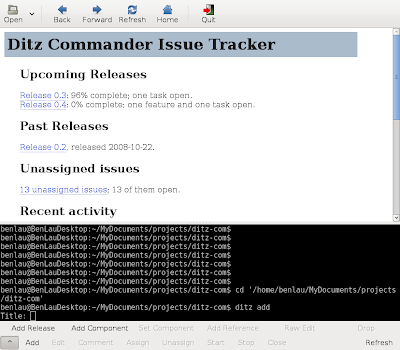
    Ditz Commander is a simple GUI frontend for ditz (light weight distributed issue tracker).

    Project page : http://code.google.com/p/ditz-commander/

    ChangeLog (v.04):
    • Added "New" window button in toolbar to create new window of commander
    • Prompt dialog if the opened path is not a valid ditz repository to ask to run "ditz init" command
    • Refresh button is renamed to HTML button
    • Supported shortcut keys binding for toolbar items
    • Ctrl+N - Create new window
    • Ctrl+O - Open repository
    • Alt+Left - Go to previous page
    • Alt+Right - Go to next page
    • Ctrl+R - Reload page
    • Alt+Home - Go to the index page
    • Ctrl+Q - Quit

    Wednesday, October 29, 2008

    Ditz Commander 0.3 released

    Project page : http://code.google.com/p/ditz-commander/

    Changelog:
    • Added new Tool buttons : Go back & Go forward
    • Added extra command list for non-common command
    • Implemented commands : "add-release" , "add-component" , "set-component" , "Unassign" , "Stop" , "Raw Edit"
    • Added "Recently opened folder" menu
    • Raw Edit Command - Launch $EDITOR (default is vim) and open raw issue file
    • Bug Fix - It is now able to handle relative path as input argument of command "ditz-commander"
    • Change window title according to the current loading page
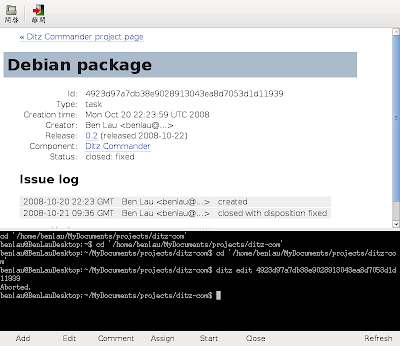
    Screenshot:


    From Blog

    Wednesday, October 22, 2008

    Ditz Commander

    Ditz Commander is a simple GUI frontend of ditz (light weight distributed issue tracker).

    Features
    • Integrate HTML browser and terminal in a single UI window
    • Short cut to ditz commands like "add" , "edit" , "comment" and "html"
    • Auto determine the Issue ID of loading page for ditz commands like "edit" and "comment". No need to copy & page issue ID from HTML page.
    • A single "refresh" button to generate HTML document and refresh browser content
    Screenshot (v0.2)


    Project page : http://code.google.com/p/ditz-commander/

    Sponsor